An order paid through Square refunds back to the customer through Square. You can refund from the order in Stallee, or in your Square Dashboard. Stallee keeps the order, your stock and the customer's email in step either way. The examples follow Mara Quinn, who runs Saltbush Ceramics.
Refund a Square Order from Stallee
The steps are the same as for any order.
- Open the order, choose More Actions and then Refund.
- For each item, set Quantity to refund. Tick Refund shipping if you are returning delivery too, and lower Shipping to refund to return only part of it.
- Check Restock items. It starts ticked for items not yet sent and unticked for items already sent. Tick it if the items can be sold again; leave it clear for a goodwill refund.
- Leave Email the customer ticked if you want Stallee to tell them about the refund.
- Check Refund amount. Type a different amount to refund less, or a goodwill amount with no items chosen. It can never be more than is left to refund, which counts refunds made in Square Dashboard too.
- Add a Reason for refund if you like. Only your team sees it, in Order History.
- Choose Review Refund, check the amount, the stock that goes back and whether the customer is emailed, then choose the button that shows the amount. A refund cannot be undone.
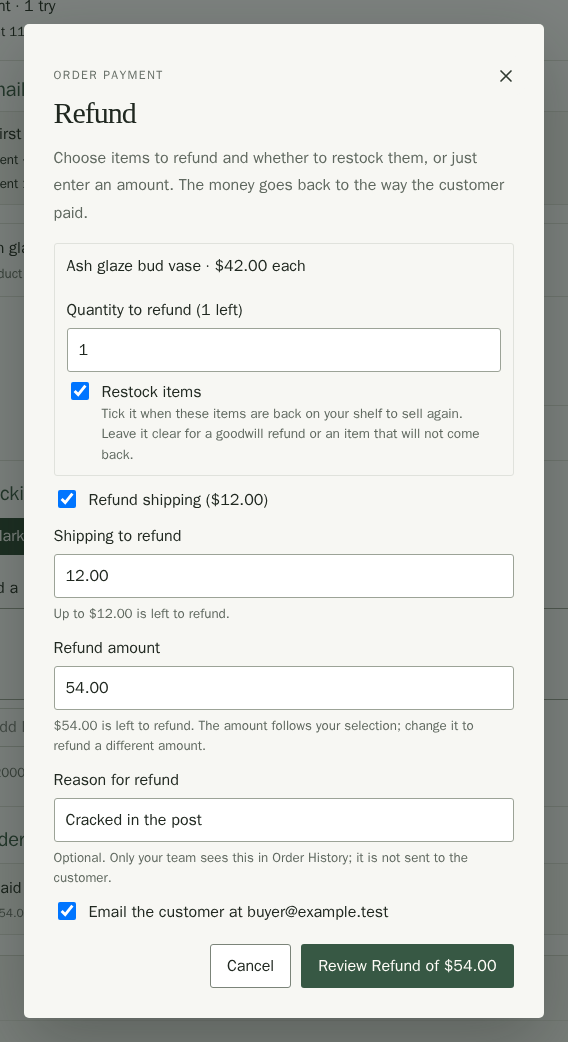
Stallee asks Square to send the money back to the customer's card. The order then lists the refund under Refunds. To cancel an order before you ship it, choose More Actions and then Cancel Order. By default it restocks every item and refunds everything still owing through Square; you can untick Restock items, note a reason for your team, or choose Don’t refund to cancel without returning money. Stallee shows what the cancellation will do before you confirm it. If Square could not be reached, the refund is saved and you can choose Try Refund Again in a moment.
If Refunds says Refund failed and Square declined it, check the payment in your Square Dashboard. If the order shows Stock Check, review its stock before you choose Mark Stock Checked.
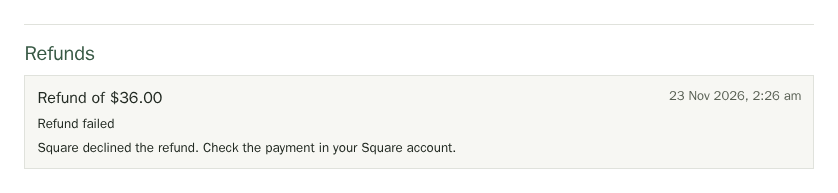
See Orders for more about refunding and cancelling.
When You Refund in Square Instead
If you refund a payment in your Square Dashboard, Square tells Stallee and the refund shows up on the order.
- The order lists the refund with Refunded in Square, not in Stallee.
- Stallee holds the order so you do not ship it by mistake. Its history says Refund needs checking.
- Stallee does not change your stock, because it cannot know what came back. The order shows a Stock Check label. Check what came back, adjust the product's stock in its Stock section, then choose Mark Stock Checked on the order.
Disputes
A customer can dispute a payment with their bank. Square tells Stallee, and Stallee holds the order and shows Dispute needs checking in its history, so you do not ship an order that may be reversed.
- Open the order and read the note in Order History.
- Respond to the dispute in your Square Dashboard. Square holds the evidence process and the outcome.
- When Square has settled it, check the order, then continue or refund it as you decide.
Stallee does not respond to disputes for you. It only makes sure you notice them.