All GuidesSupport (opens in a new tab)Back to Stallee

Start here

  • Getting Started
  • Start a Market Business in Australia
  • Plans and Billing

Sell

  • Products
  • Collections
  • Import Products
  • Stock Levels and Locations
  • Online Sales
  • Discounts
  • Google Product Feed
  • Orders
  • Customers
  • Sales
  • Stockists
  • Wholesale
  • Consignment
  • Subscribers
  • Reviews
  • Payments
  • Choose Stripe or Square for Online Payments
  • Turn On Square Payments
  • Refunds and Disputes on Square Orders
  • Custom Order Balances on Square

Shop website

  • Storefront Analytics
  • Policies
  • Site Design
  • Site Pages
  • Journal
  • Website Address
  • Links and QR Signs
  • Markets
  • Messages

Settings

  • Settings
  • Team
  • Backups

Your account

  • Account and Security
  • Closing Your Business

Market organiser

  • Your Organiser Workspace
  • Organiser Plans and Organiser Pro
  • Market Organiser Team
  • Market Stallholders
  • Market Floorplans
  • Publish Market Floorplans

Stallee help

Custom Order Balances on Square

Email a custom order's buyer a Square payment link for the balance, and send it again if it runs out.

A custom order is paid in two parts: a deposit at checkout and a balance when the piece is ready. When the order was paid through Square, Square does not keep the customer's card. So Stallee emails the customer a Square payment link for the balance instead of charging a card. The examples follow Mara Quinn, who runs Saltbush Ceramics.

This applies to custom orders whose deposit was paid through Square. Custom orders paid through Stripe are charged to the saved card, as described in Orders. Only the shop owner and admins can send the balance link.

Email the Balance Link

  1. Open the custom order and find the Custom Order section. It says Custom order · balance due.
  2. Enter the Final price. Under it, Stallee shows the balance, which is the final price less the deposit.
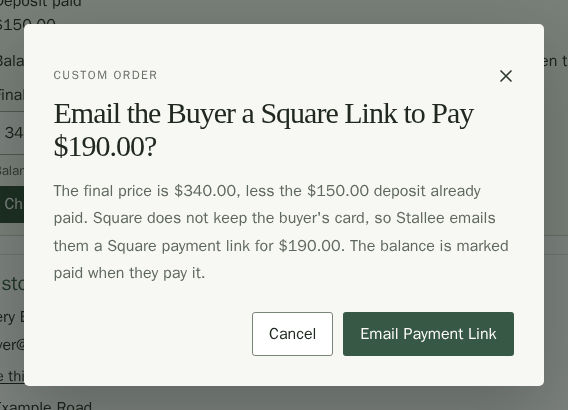
  3. Choose Charge Balance. Stallee asks Email the Buyer a Square Link to Pay the balance.
  4. Choose Email Payment Link.
The confirmation for a Square custom order. It asks to email the buyer a Square link to pay the balance, explains that Square does not keep the buyer's card, and offers Cancel and Email payment link buttons.

The order then says Custom order · payment link sent, and the customer gets an email with a button to pay. When they pay on Square's page, the balance is marked paid and the order can be shipped.
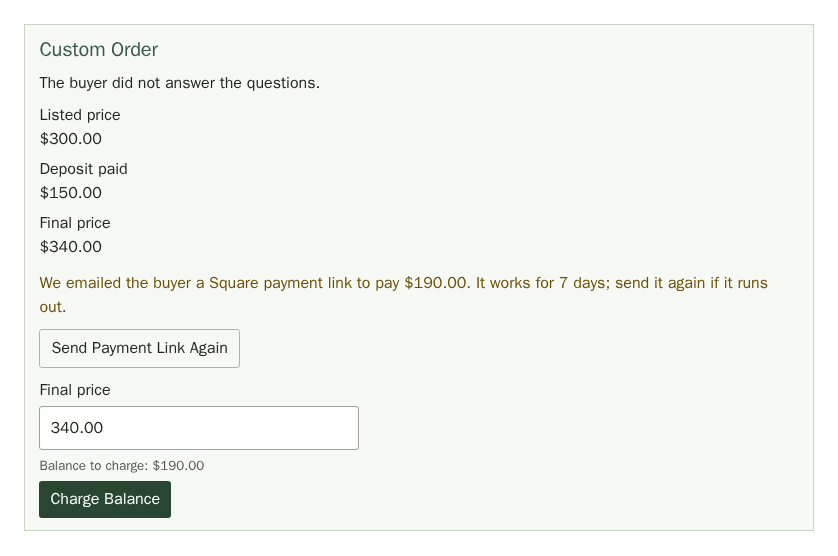
The Custom order section after the link is sent: the final price, a note that Stallee emailed the buyer a Square payment link that works for 7 days, a Send payment link again button, and the Final price field and Charge balance button below.

If the order has no buyer email, Stallee cannot email the link. The order says so and shows the link with a Copy Link button, so you can send it to the customer yourself.

Send the Link Again

A balance link works for 7 days. After that, Stallee deletes it in Square so nobody can pay on an old link. If the customer lost the email or the link has run out, choose Send Payment Link Again. Stallee makes a fresh link for the same balance and emails it.

If the Final Price Equals the Deposit

There is nothing more to collect. Stallee asks Mark the Balance Paid? and does not send a link.

Refunds

A refund comes from the balance payment first, then the deposit, and each goes back through Square. If you cancel or refund an order, Stallee also deletes any balance link that has not been paid. See Refunds and disputes on Square orders.

PreviousRefunds and Disputes on Square OrdersNextSite Design
Made for independent retail.
TermsPrivacyAccessibilitySupport (opens in a new tab)
Dark mode